Install it, open a folder, send one prompt.
Everything AgentMark does, in the order you will need it. No account, no key, no setup beyond picking a folder.
Install
Download the disk image from the download page, drag AgentMark into/Applications, and open it. macOS 11 or later, Apple Silicon or Intel. The build is signed and notarized.
Your first review
Open a folder
Drop a folder on the window, or press ⌘O. Every Markdown file under it is indexed, and so is every image the documents reference.
Read the change banner
The workspace opens on the most recently changed document. The banner says how many blocks changed since your last read, and the sidebar groups changed files at the top.
Select a sentence and add a note
A selection raises a small control. Press ⌥M to write the note. The note is anchored to the paragraph, with its heading path and line number, not to a character offset that breaks when the file changes.
Send it back
Copy for agent (⌥⇧G) writes one Markdown prompt: the file paths, the line numbers, and every open note. Paste it into the agent you already use.
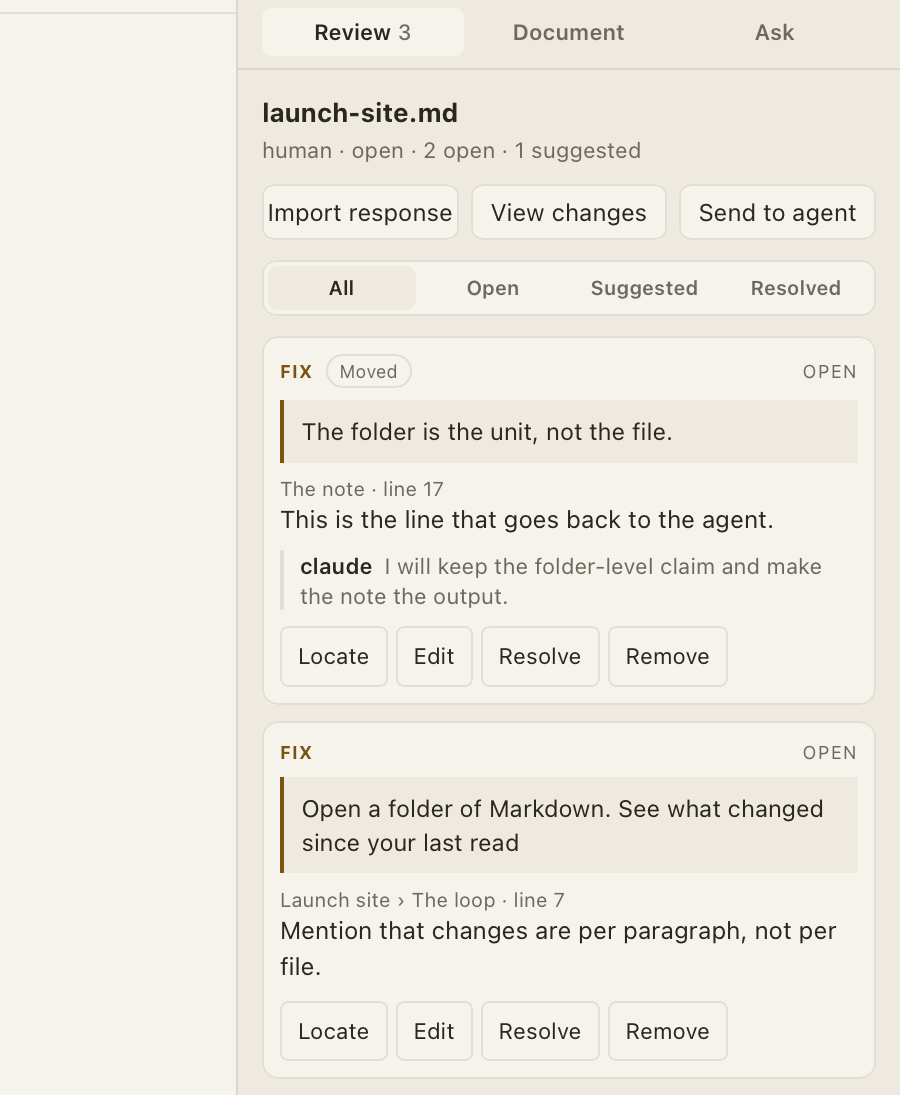
Connect an agent over MCP
The MCP server ships inside the app. Settings → Integrations shows the exact binary path and a copy-ready snippet for each client. AgentMark never edits your agent config files.
Claude Code
claude mcp add agentmark -- /Applications/AgentMark.app/Contents/MacOS/agentmark-mcpCodex (~/.codex/config.toml)
[mcp_servers.agentmark]
command = "/Applications/AgentMark.app/Contents/MacOS/agentmark-mcp"
Cursor (~/.cursor/mcp.json)
{
  "mcpServers": {
    "agentmark": {
      "command": "/Applications/AgentMark.app/Contents/MacOS/agentmark-mcp"
    }
  }
}
Restart the agent after adding the server.
What the agent can call
Six read tools and two writes. Reads go straight to the database and do not need the app open.
| Tool | What it does |
|---|---|
list_projects | Folders you added, with document counts |
list_documents | Indexed documents, newest first, optionally changed since a time |
read_document | Current file text, capped at 2 MB |
search_documents | Full-text search with ranked snippets |
get_review | The active review: documents, notes, proposals, replies |
wait_for_review | Polls up to 50 seconds for new review activity |
submit_proposals | Files suggested changes after you approve them |
reply_to_note | Replies to one note after you approve it |
Writes are the only calls that touch the app, and each one raises a consent dialog naming the client and the affected documents. The server never writes files.
Bring your own key
Settings (⌘,) → AI. Pick Anthropic, OpenAI, or a compatible endpoint, paste a key, and press Test. The key is stored in the macOS Keychain, never in the database, local storage, or logs.
Compatible endpoints cover Ollama, LM Studio, OpenRouter, and Groq. A local server may not need a key. The base URL has to include the version segment when the server expects one, such ashttp://localhost:11434/v1.
Nothing is sent automatically. The first send per document and scope asks for confirmation, showing the provider, model, and an approximate token count.
What lives where
- Your folder
- Untouched. AgentMark reads it and only writes when you accept a suggested change.
- Index and notes
- SQLite in
~/Library/Application Support/com.mohitkhare.agentmark. - API keys
- macOS Keychain, one entry per provider.
- License
- Verified offline and cached in the Keychain.
Keyboard shortcuts
Every primary action has one, and the palette shows the same hint.
| Shortcut | Action |
|---|---|
| ⌘O | Open files |
| ⌘⇧O | Open a folder |
| ⌘⇧R | Re-read folder |
| ⌘K | Command palette |
| ⌥P | Files palette |
| ⌘⇧F | Search content |
| ⌘N | New document |
| ⌥⇧M | Open review rail |
| ⌥⇧G | Copy prompt for agent |
| ⌥M | Add a note on the selection |
| ⌥1 / ⌥2 / ⌥3 | Read, Split, Edit |
| ⌥W | Cycle reading width |
| ⌥+ / ⌥− | Reading size |
| ⌘⇧T | Paper and ink |
| ⌥⇧F | Focus mode |
| ⌘\ | Toggle sidebar |
| ⌘, | Settings |
| ⌘S | Save a copy as Markdown |
| ⌘⇧S | Export HTML |
| ⌥⇧P | Print preview |
| ? | Show every shortcut |
Docs questions
Do I need an API key to use AgentMark?
No. Reading, diffs, notes, and copy for agent work without one. A key is only needed for the Ask rail, which calls a provider directly with your key.
Which folder should I open?
The one your agent writes into. Claude Code, Codex, and Cursor all leave Markdown in a project folder, so open the project or the folder under it that holds plans, specs, reviews, and notes.
Where is my data stored?
The folder stays where it is. The index, read snapshots, review notes, and reading history live in a SQLite database in application support on your Mac.
Can I use AgentMark without any agent?
Yes. It is a Markdown reader with change awareness, search, themes, and print. The review loop is there when you want it.
Does it work with Obsidian vaults?
Yes, any folder of Markdown. AgentMark does not modify your files unless you accept a suggested change.